

How to Modify AI Generated Prompts: A Practical Guide

Table of Contents
- Why Modifying AI Prompts Matters for Your Workflow
- Understanding the Basics: What Happens When You Modify AI Prompts
- Iterative Prompt Refinement Techniques That Actually Work
- Core Modification Techniques: Adding, Removing, and Replacing Elements
- AI Prompt Engineering Best Practices for Sustainable Results
- AI Prompt Templates for Creators: Building Reusable Modifications
- Troubleshooting Common Prompt Modification Issues
- Practical Workflow: From Initial Prompt to Production-Ready Output
- Frequently Asked Questions
Last Updated: September 23, 2026
Why Modifying AI Prompts Matters for Your Workflow
The first version of AI output rarely delivers exactly what you need. That's where knowing how to modify AI generated prompts becomes essential. A few targeted adjustments often solve in minutes what would otherwise take hours of manual refinement.
When you understand how to iterate on prompts systematically, you unlock the ability to generate usable content quickly and consistently, avoiding wasted hours or mediocre results.
This guide walks you through the exact techniques that work. You'll learn how to diagnose what's wrong with an output, adjust your prompt strategically, and test the results. By the end, you'll have a repeatable workflow that turns AI from a frustrating tool into a genuine productivity multiplier.
Understanding the Basics: What Happens When You Modify AI Prompts
AI models process your words as patterns and probabilities. When you modify a prompt, you're shifting those patterns in specific ways.
How AI Models Interpret Your Changes
Your prompt becomes mathematical vectors the model uses to generate output. Vague instructions like "make it better" don't shift patterns meaningfully, but specific ones do. Saying "use a formal tone with short sentences under 12 words" gives the model concrete parameters to follow.
Small, targeted changes usually beat large rewrites. If 80% of your output is good, adjust the 20% that isn't rather than rewriting the entire prompt.
The Role of Context and Token Management
AI models have a context window limiting how much information they can process (typically 4,000 to 100,000 tokens). Include enough context to guide output accurately, but not so much that you waste tokens on unnecessary information. When modifying, check whether you're adding redundant instructions or removing critical details.
Iterative Prompt Refinement Techniques That Actually Work
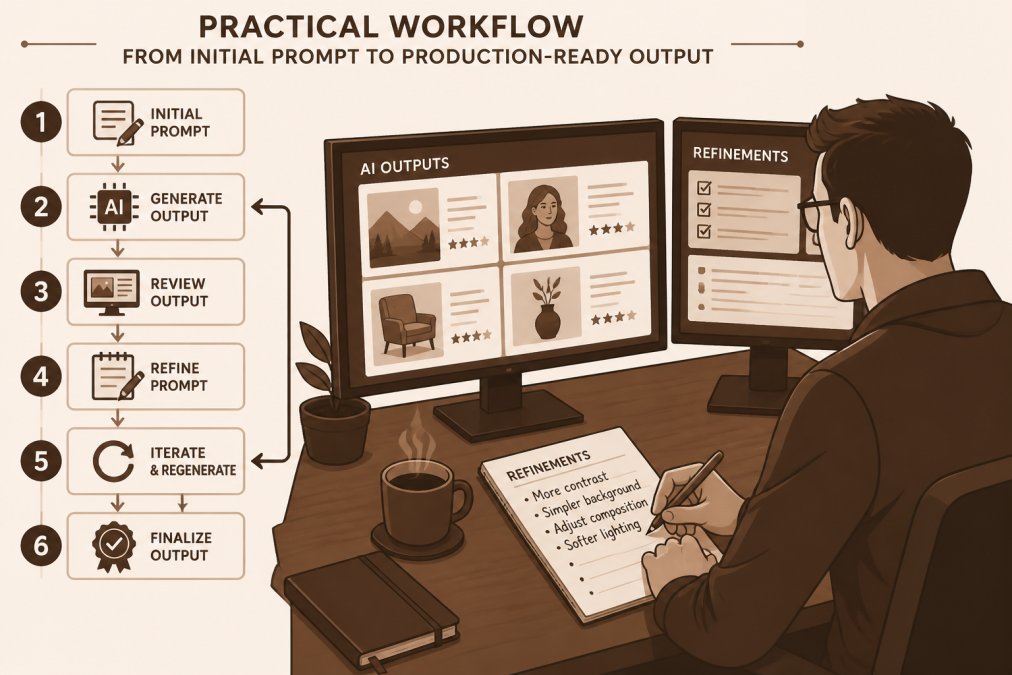
The best results come from treating prompt modification as a cycle: test, observe, adjust, and test again. This iterative approach is where most of the real skill lives.
Step 1: Start with a Clear Initial Request
Your first prompt needs to be clear: state what you want, who it's for, and what format you want. Instead of "Write something about email marketing," write "Write a 150-word email subject line for a SaaS product launch targeting small business owners. Make it urgent without being pushy." Specificity about word count, audience, tone, and format creates a solid foundation.
Step 2: Test and Analyze the Output
Generate output and read it carefully. Ask: Does this match what I asked for? What parts are good or off? Is the tone and length right? Does it address the right audience? Write down what worked and what didn't, this becomes your modification roadmap.
Step 3: Make Targeted Adjustments
Modify the prompt based on what you observed: add "use a professional tone" if it's too casual, specify exact word count if too long, clarify the audience if missed. Make one or two changes at a time so you can see which adjustments actually improve results.
Step 4: Refine Based on Results
Test the modified prompt and analyze the new output. Keep what's working, adjust what isn't. Most outputs reach usable quality in 2-4 iterations. If unsatisfied after five rounds, consider starting over with a different angle.
Core Modification Techniques: Adding, Removing, and Replacing Elements
Once you understand the iterative cycle, you need specific techniques for making changes. Here are the core moves.
Adding Context and Detail to Existing Prompts
When output is vague or generic, add specific details about the audience, purpose, format, tone, and constraints (word count, style, specific points).
Instead of "Write about AI prompts," write "Write a 200-word beginner's guide to AI prompts for digital product creators who have never used AI before. Include one concrete example. Use simple language. End with a call to action to explore DP Crate's prompt library." Added context dramatically improves relevance and usability.
Removing Unnecessary Instructions
Output is often off because of conflicting or redundant instructions. If you said "write casually" and "use a professional tone," the model must choose. Review your prompt and remove contradictions and repetitions, keeping only what's essential.
Replacing Objects and Parameters
Sometimes you need to swap out specific elements without changing the overall structure. If a prompt generates good content but the tone is wrong, replace "casual" with "formal." If the length is wrong, replace "500 words" with "150 words."
This technique preserves what's working while fixing what isn't. It's faster than rewriting the entire prompt.
AI Prompt Engineering Best Practices for Sustainable Results
Good prompt modification isn't random. It follows patterns that work across different models and use cases. These best practices make your iterations more effective.
Use Natural Language for Clearer Edits
Write your prompts like you're giving instructions to a smart colleague, not a machine. Use complete sentences. Use the word "and" instead of commas when listing items. Say what you want, not what you don't want (mostly).
100,000+ ChatGPT Prompts | AI Prompt →
Instead of: "No fluff. No jargon. No sales language."
Write: "Use clear, simple language. Focus on practical value. Avoid marketing speak."
Natural language prompts tend to produce more natural outputs. They're also easier to modify because you can see exactly what you're changing.
Implement Negative Prompting to Exclude Unwanted Outputs
Sometimes you need to tell the model what NOT to do. This is called negative prompting. It's useful when the model keeps generating something you don't want.
Test Before Scaling
Never assume a prompt will work at scale without testing it first. Generate a few outputs. Review them carefully. Make adjustments. Then generate more.
AI Prompt Templates for Creators: Building Reusable Modifications
The real efficiency comes from building templates you can reuse and modify. Instead of creating a new prompt from scratch every time, you start with a template and adjust it for your specific need.
Creating Template Structures for Consistent Modifications
A good template includes the essential elements: the task, the audience, the format, the tone, and any specific constraints. You fill in the blanks for each new project.
Template structure:
Filled in example:
Prompt Chaining for Complex Modifications
Sometimes one prompt can't do everything you need. Prompt chaining means using the output from one prompt as input for another. This technique handles complex modifications that a single prompt might struggle with.
Troubleshooting Common Prompt Modification Issues
Sometimes your modifications don't work the way you expected. Here's how to diagnose and fix the most common problems.
When Your Modified Prompt Produces Worse Results
This usually means you changed something that was working. Go back to your previous prompt. Compare them line by line. Identify what changed. Revert that specific change and test again.
Handling Conflicting Instructions
If your prompt tells the model to do two contradictory things, the output will be confused. Review your prompt for conflicting instructions. Choose one direction and remove the contradiction.
Managing Token Limits and Context Windows
If your output cuts off or feels incomplete, you might be running out of tokens. Reduce the amount of context you're providing. Remove unnecessary instructions. Ask for shorter output.
| Issue | Cause | Fix |
|---|---|---|
| Output cuts off mid-sentence | Token limit exceeded | Reduce context or request shorter output |
| Output is vague or generic | Insufficient context | Add specific audience, purpose, format details |
| Output contradicts itself | Conflicting instructions | Remove contradictions, choose one direction |
| Output is wrong tone | Tone instruction missing or unclear | Add specific tone guidance with examples |
| Output includes unwanted elements | No negative instructions | Add "Do not include..." statements |
Practical Workflow: From Initial Prompt to Production-Ready Output
Here's how to move from a rough idea to output you can actually use.
Frequently Asked Questions
How do I refine an AI prompt after the initial generation?
Start by analyzing what the output is missing or what needs adjustment. Use iterative refinement by making one targeted change at a time, then test the result. Add context if the output is too generic, remove instructions that conflict, or replace specific elements with new parameters. Document what works so you can build on successful modifications rather than starting over. This methodical approach prevents the common mistake of making too many changes at once, which makes it impossible to know what actually improved your results.
What is negative prompting and how does it improve my AI prompt modifications?
Negative prompting tells the AI what NOT to include in the output. Instead of only describing what you want, you explicitly exclude unwanted elements, styles, or approaches. For example, if you're modifying a prompt for professional content, you might add 'avoid casual language, slang, or overly complex jargon.' This technique works because it gives the AI clear boundaries, reducing output variation and making your modifications more predictable. It's especially useful when you're refining prompts for resale or client work where consistency matters.
Can I use prompt templates to speed up modifications for multiple projects?
Yes. Build reusable prompt templates by identifying the core structure that works, then create placeholders for variables you'll change. For example, a content creation template might have sections for tone, audience, topic, and length that you swap out for each project. This approach saves time when you're modifying AI prompts across similar tasks. Many creators use prompt chaining, where one prompt's output feeds into a modified second prompt, to handle complex modifications without starting from scratch each time.
What should I do if my modified prompt produces worse results than the original?
Revert to the version that worked and make smaller, single changes instead. Document what you changed so you can isolate which modification caused the problem. Often, worse results come from conflicting instructions, exceeding the AI model's context window, or removing important context. Test each modification independently before combining them. If you're working with prompts from DP Crate's AI Prompt Vault, you can use the original as a baseline and make incremental adjustments to preserve what's already working.